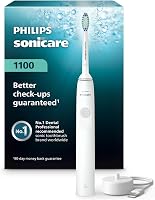
How to Charge an Electric Toothbrush
To charge an electric toothbrush, use a charger compatible with your exact handle and follow the model’s manual for placement and timing. Keep the charging setup dry, and check the instructions for its charging indicator.
On this page (8 sections)
- How do you charge an electric toothbrush?
- How can you tell whether the charger fits your toothbrush?
- Where should you place the charging base?
- How long does an electric toothbrush take to charge?
- Why is your electric toothbrush not charging?
- Can you leave an electric toothbrush on the charger?
- How should you clean the handle and charger?
- How to charge an electric toothbrush: what should you do?
To charge an electric toothbrush, use a charger compatible with your exact handle and follow the model’s manual for placement and timing. Keep the charging setup dry, and check the instructions for its charging indicator.
Look for the model number on the handle or its packaging before choosing a charger. A base that looks similar may not fit your toothbrush’s charging system.
How do you charge an electric toothbrush?
Place the handle on its compatible charger and connect the charger to the power source specified in the instructions. Keep the charging setup dry, then check the manual for the expected charging signal and charge time.
A typical routine looks like this:
- Find your toothbrush’s model number and charging instructions.
- Check that the charger supports that exact model.
- Position the charger as its instructions direct, using a stable, dry surface for a tabletop base.
- Connect it to the specified power source.
- Set the handle onto the base as shown in the manual.
- Check the charging indicator and follow the recommended charge time.
The MeaeJoto and PDAPTMAG chargers both use induction charging. Don’t assume every base works with every handle just because both are intended for the same brand.
How can you tell whether the charger fits your toothbrush?
Match the charger’s supported models to your handle’s exact model number. Confirm the model before buying or trying a replacement base, especially if you have an older toothbrush or a model with a different charging system.
The MeaeJoto Oral-B Charger supports many Oral-B models, including iO 2 through 6 and several Pro and Genius models. It excludes iO 7 through 10, Pulsonic models, and Philips Sonicare brushes.
The PDAPTMAG Sonicare Charger Base supports a range of Sonicare handles, including HX4100 and HX5100 models. It excludes Philips Smart 9000, 9300, 9500, 9700, 9750, and 9900 series.
Use the electric toothbrush replacement head compatibility guide for brush-head questions. Brush-head fit and charger fit are separate checks.
Where should you place the charging base?
Put a tabletop base on a stable, dry surface, or install an outlet-mounted charger as its instructions direct. Keep the plug and any cord away from splashes, and don’t place the charger where water can pool around it.
Follow the charger’s placement instructions and dry your hands before handling its plug. Prepare the handle for charging as the toothbrush manual directs.
An outlet-mounted charger can free up counter space, but check that its plug and mounting method suit your outlet. The MeaeJoto base plugs directly into an outlet and includes adhesive strips, while the PDAPTMAG base is a tabletop charger.
Both replacement chargers have Type A, 2-pin North American plugs. Check the power requirements and outlet fit before using either one while traveling.
How long does an electric toothbrush take to charge?
Use the charge time in your toothbrush’s manual. Don’t use its stated brushing runtime as an estimate of how long charging takes.
If the handle shows no charging signal, follow the manual’s instructions for that situation. Avoid assuming that more time on an unconfirmed charger will solve the problem.
Philips says the Sonicare 4100 provides up to 14 days of use per full charge, based on 2 brushing sessions of 2 minutes each per day in standard mode. It includes a USB charger, but no power adaptor.
If you’re comparing handles as well as charging routines, see our guide to the best electric toothbrushes for adults.
Why is your electric toothbrush not charging?
Check the power connection, charger match, and handle placement first, following the manual. These checks can help you decide whether to adjust the setup or seek support.
- Check that the power source is working using the manual’s troubleshooting steps.
- Confirm the charger is connected securely.
- Match the charger to your exact handle model.
- Unplug the charger before cleaning it as instructed.
- Let cleaned parts dry as directed before reconnecting.
- Seat the handle correctly and check for the expected charging signal.
Don’t open the handle or charger to inspect the battery. If the toothbrush still won’t charge, contact the manufacturer or follow its support instructions.
For model-specific steps, read why a Sonicare toothbrush may not be charging. Use the guide to resetting a Sonicare toothbrush only where it applies to your Sonicare model; use your Oral-B manual for Oral-B reset steps.
Can you leave an electric toothbrush on the charger?
Follow the charging and storage instructions for your exact model. Check those instructions before deciding to leave the handle on its base between uses.
Keep the charging setup dry and follow its placement requirements. For more detail, see whether you can leave an electric toothbrush on the charger.
How should you clean the handle and charger?
Unplug the charger, then clean each part as its manual directs and let it dry before charging. Don’t treat a water-resistance rating as permission to soak a connected charger.
For toothpaste residue, use the cleaning method approved for your handle and base. Avoid cleaning products or tools that the manufacturer does not recommend.
Our guide to cleaning an electric toothbrush handle and head covers routine care. If you travel with your toothbrush, check the advice on taking an electric toothbrush on a plane.
How to charge an electric toothbrush: what should you do?
Choose a charger that supports your exact handle when deciding how to charge an electric toothbrush. Use the manual to confirm the power source, placement, charging signal, and timing.
Choose the MeaeJoto Oral-B Charger only if it supports your Oral-B model. Consider the PDAPTMAG Sonicare Charger Base only if it supports your Sonicare model, and check the Smart series exclusions.
If you need a complete toothbrush, the Sonicare 4100 includes a USB charger. You'll need a suitable power adaptor because one is not included.
For more care guidance, visit the heads, charging, and care guides.
Frequently asked questions
How do I know if my electric toothbrush is charging?
Check the handle’s indicator light or display against the instructions for your exact model, since charging signals can vary between handles. If you cannot confirm that it is charging, follow the manual’s troubleshooting steps rather than assuming that a handle resting on a base is receiving power.
Can I charge an electric toothbrush with any charger?
No, use a charger confirmed to work with your exact toothbrush model, since similar-looking bases do not guarantee compatibility. Check the handle’s model number against the charger’s supported models and exclusions before connecting them, even if the charger is intended for the same toothbrush brand.
Should I leave my electric toothbrush on the charger?
Follow the instructions for your exact handle to decide whether to leave it on the charging base between uses. Keep the charging setup dry, follow any storage directions, and see our guide to leaving an electric toothbrush on its charger for more help with that decision.
Why is my electric toothbrush not charging?
Start by checking the power connection, charger compatibility, and handle placement, following the manual for your exact toothbrush. If the setup is dry and correctly connected but a Sonicare handle still will not charge, follow our steps for a Sonicare toothbrush that is not charging or contact the manufacturer.